Magic Magnify for WordPress
posted byTweakThisinContent Management
Display your images in detail. This magnify plugin was created for use on WordPress. Simply hover over an image and an elegant effect appears in the form of a magnifying glass. The size of the magnifier is easily controlled by your mouse wheel depending how large or small you want the image to be magnified. Magic Magnify works on all major web browsers. If you want it to work on iPad and iPhone, then get the next version up: Magic Magnify Plus. Contact us if you need any help with the plugin. Follow us for the very latest on Facebook: http://www.facebook.com/MagicToolbox and Twitter: http://twitter.com/magictoolbox
Reviews0
PriceFree
Views953
Lobby Track Visitor Management Software
posted byjollysubmitinSecurity
Visitor management software for visitor registration, tracking, and reporting. Pre-register visitors online or register onsite. Issue visitor badges. Maintain visit logs. Check against watch lists (FBI's most wanted, etc.).
Reviews0
PriceUSD 999.00
Views982
Multimedia Thumb Wall 3D
posted byFlashStorePublishinginFla Archives
Gallery Features:
XML driven
the entire theme color can be changed inside the XML file
supports all image files (png, jpg, gif etc), mp3 sounds, SWF files and also video files
set the thumb size
set the space between the thumbs
set the background color
Reviews0
PriceUSD 20.00
Views631
Super Video Players Pack
posted byFlashStorePublishinginFla Archives
You can set this player to any size you want from the configuration XML file, changing the player width , the player height and the playlist width. You can easy integrate this in any projects you need, HTML or Flash.
Reviews0
PriceUSD 38.00
Views701
Magic Magnify for Joomla
posted byTweakThisinJoomla / Mambo Modules
Images are important to a website, and customers want to see them clearly. Magic Magnify allows you to display your images in great detail.
Hover over an image and a magnifying-glass appears to show a close-up aspect of the product image.
The size of the magnifier is easily controlled by your mouse wheel depending how large or small you want the image to be magnified.
Magic Magnify can be used on any website, CMS, ecommerce site, shopping cart or blog so it is perfect for Joomla.
It is compatible with all major browsers. If you want it to work on iPad and iPhone, then get the next version up: Magic Magnify Plus.
This module has been created for Joomla 1.7. If you are using an older version of Joomla please visit our website and download the relevant module from there.
Feel free to contact us if you need any help.
Follow us for the very latest on Facebook: http://www.facebook.com/MagicToolbox and Twitter: http://twitter.com/magictoolbox
Reviews0
PriceFree
Views899
Magic Magnify Plus for Joomla
posted byTweakThisinJoomla / Mambo Modules
An easy way to bring a website to life is to bring your images to life. This 2-in-1 zoom functionality does just that.
You can hover your cursor over an image to magnify the picture; or click the image and it will enlarge to full screen.
Magic Magnify Plus uses Flash and JavaScript but you need no experience of either. It's really simple to install and only takes a few minutes.
It is compatible with all major browsers and works on the iPhone and iPad too - tap the image and it enlarges to full screen.
This module has been created for Joomla 1.7. If you are using an older version of Joomla please visit our website and download the relevant module from there.
Contact us if you need any help.
Follow us for the very latest on Facebook: http://www.facebook.com/MagicToolbox and Twitter: http://twitter.com/magictoolbox
Reviews0
PriceFree
Views1122
Magic Scroll for Joomla
posted byTweakThisinJoomla / Mambo Modules
No more static web pages with Magic Scroll. A beautiful tool for scrolling images, text, SWF, movies and HTML. Examples of these are: latest news headlines; "people who bought this also bought" and promotional banners.
You can customize the look of the scroll with our Magic Scroll wizard which is available for beginners. We also have 16 JavaScript settings and CSS options available for intermediate/advanced designers to try out.
Works on all major browsers, iPad, iPhone and most Android devices too.
This module has been created for Joomla 1.7. If you are using an older version of Joomla please visit our website and download the relevant module from there.
Feel free to contact us for any help.
Follow us for the very latest on Facebook: http://www.facebook.com/MagicToolbox and Twitter: http://twitter.com/magictoolbox
Reviews0
PriceFree
Views1007
Magic Slideshow for WordPress
posted byTweakThisinContent Management
Display images one after another in rotation using the Magic Slideshow plugin for WordPress. Perfect for highlighting your top blog articles or promoting your latest products.
You can customize as much or as little as you want. There are over 30 options to choose from. This includes the choice to add descriptive text to each image.
Magic Slideshow works on all major web browsers. It also works on iPhone, iPad and Android devices.
It is easy to install, with just 5 simple steps.
And with a 100% money back guarantee this is definitely a win-win. Contact us if you need any help.
Follow us for the very latest on Facebook: http://www.facebook.com/MagicToolbox and Twitter: http://twitter.com/magictoolbox
Reviews0
PriceFree
Views759
Magic Zoom for WordPress
posted byTweakThisinContent Management
View images with this incredible zoom tool. Simply hover over a product image and a highly detailed image is revealed to the side. It is a great way for visitors to see your images thoroughly.
It uses JavaScript to create the zoom effect. The style is controlled with CSS. But you do not need to have any knowledge of either. It is simple to install, only takes 5 minutes.
Magic zoom works on all major web browsers but if you need it to work on iPad and iPhone, get Magic Zoom Plus which will enlarge the image on tap. Please feel free to contact us if you need any help.
Follow us for the very latest on Facebook: http://www.facebook.com/MagicToolbox and Twitter: http://twitter.com/magictoolbox
Reviews0
PriceFree
Views724
Magic Zoom Plus for WordPress
posted byTweakThisinContent Management
View images in greater detail. This 2-in-1 zoom functionality lets you zoom AND enlarge images. Hover over your image and a large zoomed area will appear. Click and the image will enlarge over your website.
Customise Magic Zoom Plus with any one of the 41 options available. Easy to install, simply follow the 5 step installation process.
It is iPhone and iPad compliant - simply tap the image and it opens the zoom version. It also works on all major web browsers. If you require help, please contact us.
Follow us for the very latest on Facebook: http://www.facebook.com/MagicToolbox and Twitter: http://twitter.com/magictoolbox
Reviews0
PriceFree
Views1538
dhtmlxSpreadsheet – JavaScript and PHP Spreadsheet
posted byolgaboukhinContent Management
dhtmlxSpreadsheet is an open source embeddable spreadsheet written in JavaScript and PHP. It enables you to quickly add Excel-like editable tables on a web page. In contrast to online services (Google Docs, etc.), dhtmlxSpreadsheet keeps the data on your own server, so your information stays with you. The spreadsheet can be displayed in edit or read-only mode. All changes you make in a table (add/edit/delete records) are automatically saved to the database. dhtmlxSpreadsheet provides built-in export to PDF and Excel, as well as clipboard support, allowing you to copy and paste data from Excel documents right into your browser-based table.
Reviews0
PriceFree
Views1185
Magic Thumb for WordPress
posted byTweakThisinContent Management
Magic Thumb requires two images to work. A large image (approx 450-550 pixels height) and a smaller image which will act as the thumbnail (approx 80-120 pixels height). The large image appears when the thumbnail is clicked. The image loads instantly due to the lightbox effect.
Perfect for viewing large images.
It is easy to install and can be done in a matter of minutes.
It works on iPhone, iPad and Android devices as well as every major browser.
Feel free to contact us for help.
Follow us for the very latest on Facebook: http://www.facebook.com/MagicToolbox and Twitter: http://twitter.com/magictoolbox
Reviews0
PriceFree
Views778
Manage Active Directory
posted byManageActiveinSecurity
Expanding over a list of outstanding features, Lepide Active Directory Manager is an impeccably designed tool for AD Administrators for managing AD and its objects. Its intuitive interface offers the Admin a central location for managing multiple domains, servers & workstations, local or domain users, groups, tasks, network shares etc comprising of AD management and generating AD reports.
Reviews0
PriceUSD 229.00
Views720
Magic Thumb for Joomla
posted byTweakThisinJoomla / Mambo Modules
Magic Thumb is a zoom functionality created for Joomla. Perfect for viewing large images - activates on click or on hover. It requires two images to work. A large image (approx 450-550 pixels height) and a smaller image which will act as the thumbnail (approx 80-120 pixels height). The large image appears when the thumbnail is clicked. The image loads instantly due to the lightbox effect.
Versatile and easy to use. It is simple to install and can be done in a matter of minutes.
Completely customizable with 39 parameters available for you to choose from. These include: speed, position, size, effect and much more.
It works on all major browsers. It also works on iPhone and iPad because it uses JavaScript, not Flash.
This module has been created for Joomla 1.7. If you are using an older version of Joomla please visit our website and download the relevant module from there.
Please contact us if you need any help.
Reviews0
PriceFree
Views1036
Magic Zoom for Joomla
posted byTweakThisinJoomla / Mambo Modules
Magic Zoom is a JavaScript zoom tool. Hover over a product image and a highly detailed image is revealed to the side. It is the best way to inspect products close-up and a great way for visitors to see your images in detail. Everything is customizable - the position, size, colors, speed, fade and much more.
It only takes 5 minutes to install, it really is easy to use!
It works on all browsers (IE, Firefox, Chrome, Safari, Opera) but if you need it to work on iPad and iPhone, get Magic Zoom Plus which will enlarge the image on tap.
This module has been created for Joomla 1.7. If you are using an older version of Joomla please visit our website and download the relevant module from there.
Feel free to contact us if you need any help.
Follow us for the very latest on Facebook: http://www.facebook.com/MagicToolbox and Twitter: http://twitter.com/magictoolbox
Reviews0
PriceFree
Views798
Magic Zoom Plus for Joomla
posted byTweakThisinJoomla / Mambo Modules
You have created your content and it reads great but your images look flat. With Magic Zoom Plus you can change this. This 2-in-1 zoom functionality allows you to see images in greater detail. Hover over your image and a large zoomed area will appear. Click and the image will enlarge over your website.
There are 41 examples of how to customize Magic Zoom Plus including position, size, borders and zoom effects.
Easy to install, so anyone can use Magic Zoom Plus. It works on all major web browsers and iPhone, iPad and Android devices too.
This module has been created for Joomla 1.7. If you are using an older version of Joomla please visit our website and download the relevant module from there.
If you need any help, please contact us.
Follow us for the very latest on Facebook: http://www.facebook.com/MagicToolbox and Twitter: http://twitter.com/magictoolbox
Reviews0
PriceFree
Views1393
Magic Slideshow for Joomla
posted byTweakThisinJoomla / Mambo Modules
Rather than spread your images around your web page, why not use a slideshow instead? Magic Slideshow allows you to display as many images as you want one after the other in rotation. It is sleek and easy to install.
Completely customizable with over 30 options to tweak it just how you want it.
Magic Slideshow works on all major web browsers, iPad, iPhone and most Android devices too.
This module has been created for Joomla 1.7. If you are using an older version of Joomla please visit our website and download the relevant module from there.
If you need any help, please contact us.
Follow us for the very latest on Facebook: http://www.facebook.com/MagicToolbox and Twitter: http://twitter.com/magictoolbox
Reviews0
PriceFree
Views633
Removing the PHP Extension from a URL
posted bysuper3boyinRedirection
If you are developing a website in PHP then most of your files will end in the .PHP file extension. This works just fine for your development, but when you release your website the .php extension is just added characters in the URL.
Most websites that use PHP simple have the extension of the page removed. This leads to cleaner, shorter, and easier to read URLs. It is also better for your SEO or Search Engine Optimization.
Using a simple .htaccess file with a few lines we can automatically add the .php file extension to any URL without it. This means something like example.com/page will look like example.com/page.php to the computer, but still retain the cleaner look of example.com/page to the user. Note: You can still explicitly call any page even with this change.
Reviews0
PriceFree
Views703
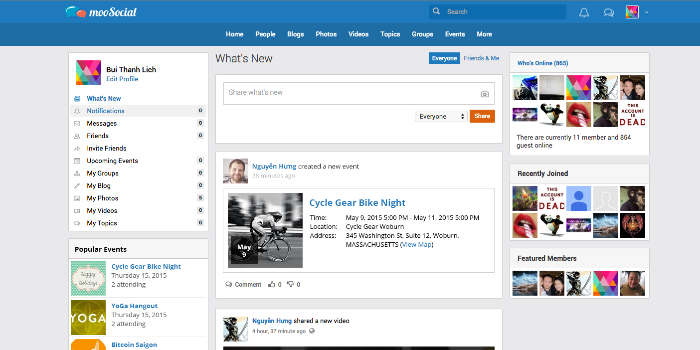
mooSocial - PHP Social Network Script
posted bymooSocialinSocial Networking
mooSocial is a responsive web design, php social network script built on top of CakePHP framework. It has all the features to build a successful community (e.g. blog, photo, group, event, video, topic...). mooSocial is fast, easy to customize, mobile friendly and CMS independent (you don't need a CMS to run it!)
Reviews20
PriceUSD 59.00
Views9539
Online Restaurant Delivery Solution
posted byordermealsinSoftware
Order Meals is a web portal facilitating online ordering of food. It provides the restaurants with a unique Online Restaurant Delivery System.
Order Meals Online Delivery System is a dynamic e-commerce process consisting of effective solutions which help you to increase your business, establish online presence, display your food menu, save valuable time of your customers, fill any communication gaps between you and your customers, receive payment online, have flexibility in payment mode, place controls on your items availability and accept advance booking orders.
Reviews0
PriceUSD 25.00
Views1407